How we test your store
Automated checks do the repetitive testing. A specialist decides what’s real, and nothing reaches your store without a person reviewing it.
What the free audit checks
The four pages every shopper passes through on the way to buying, each on a phone-sized screen (390 by 844 pixels) and a desktop screen (1440 by 900):
- Your home page
- A collection page
- A product page with options, like size or colour
- Your cart, with one item in it
What automated checks find, and what they don’t
We run axe-core, the open-source accessibility engine from Deque Systems, with its WCAG 2.0, 2.1 and 2.2 rules at levels A and AA. We add two checks of our own: moving content without a way to pause it, and content hidden from screen readers that can still be reached with Tab.
Each problem is counted once, however many pages it’s on, with where it is in your theme or which app it comes from, and a priority from P0, which can stop a shopper from buying, to P3, a small improvement.
Automated checks can’t tell whether an image description fits the image, whether the reading order makes sense, or whether a shopper can actually finish buying. In a UK government test of 10 tools, the best one found 41% of the barriers on a deliberately broken page, and only when its prompts for manual checks were counted.
A specialist confirms every problem
Before we fix anything, a specialist checks each problem in your report by hand on your live store and removes anything that isn’t real. The fix package covers the confirmed problems.
The manual audit
The manual audit is an optional extra. A specialist tests your whole shopping path by hand: the menu, search, a collection with its filters, product options, the cart and the checkout button, and any pop-up, age check or cookie banner on the way. First with the keyboard alone, then with VoiceOver, NVDA and TalkBack, on desktop and on a phone, and at 200% and 400% zoom.
Every store gets the same checklist, so you can see exactly what was tested:
- The path from your home page to the checkout button works with the keyboard alone and with each screen reader
- Every control on the path can be reached with Tab and used with Enter, Space or the arrow keys (2.1.1)
- Focus never gets stuck in a menu, pop-up or drawer (2.1.2)
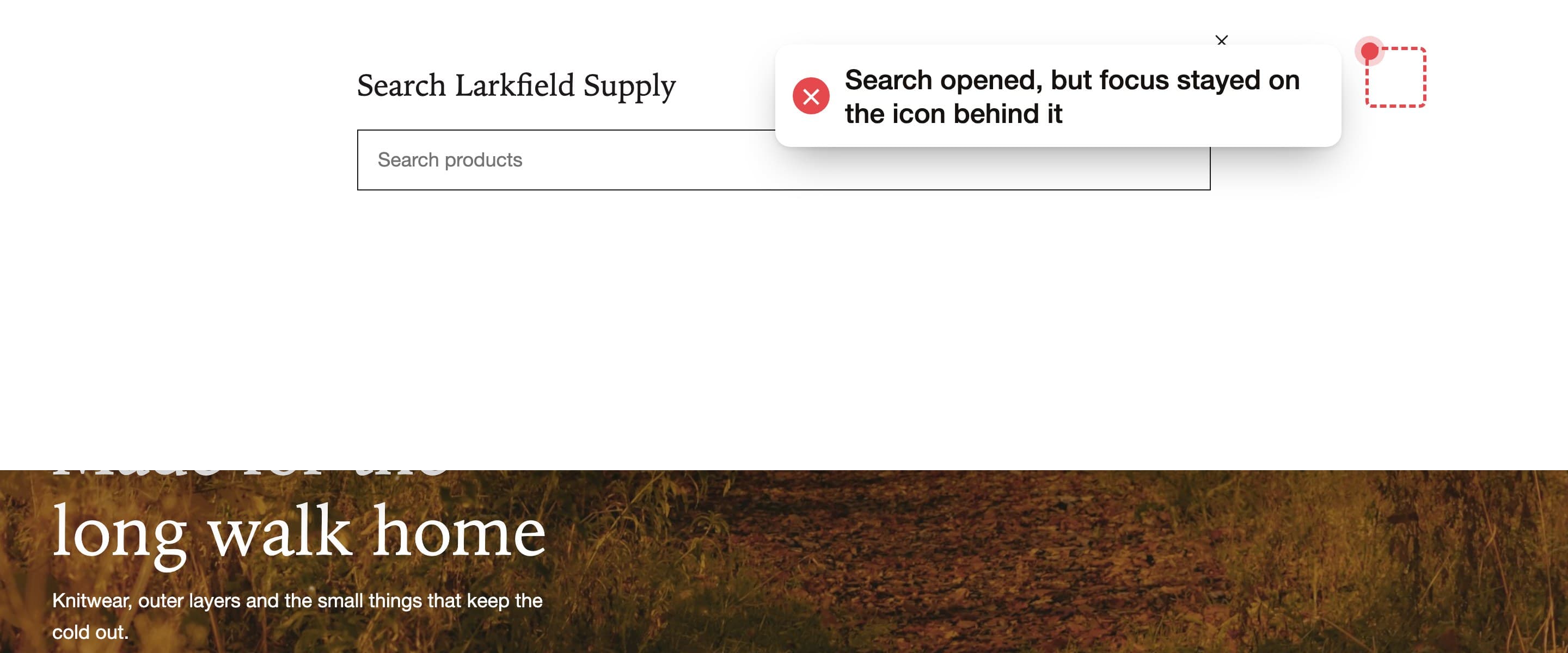
- You can always see where focus is, and it’s never hidden behind a sticky header or banner (2.4.7, 2.4.11)
- Focus follows the order on screen and never lands on hidden content (2.4.3)
- A skip link moves focus to the main content (2.4.1)
- Opening a drawer or pop-up moves focus into it, and closing it returns focus to where you were (2.4.3)
- Choosing an option doesn’t jump to another page or submit anything (3.2.1, 3.2.2)
- Menus that open on hover or focus close with Escape (1.4.13)
- Single-key shortcuts, if there are any, can be turned off (2.1.4)
- Page titles, page language, headings and landmarks describe each page (2.4.2, 3.1.1, 1.3.1, 2.4.6)
- Every button and link is announced with a name that says what it does, matching its visible text (4.1.2, 2.4.4, 2.5.3)
- Product options announce their name, their value and which one is selected (4.1.2)
- Menus, accordions and filters announce whether they’re open (4.1.2)
- Pop-ups and drawers are announced as dialogs, and the page behind stays quiet (4.1.2, 1.3.1)
- Nothing hidden from screen readers can be reached with Tab (4.1.2)
- “Added to cart”, price changes and form errors are announced (4.1.3)
- Content reads in a sensible order, and sale prices are told apart in words (1.3.2, 1.3.1)
- Product images have descriptions that fit them, and decorative images are skipped (1.1.1)
- Every form field has a label, and errors say what went wrong and how to fix it (3.3.2, 3.3.1, 3.3.3)
- Name and email fields can be filled in by the browser (1.3.5)
- Text, controls and focus outlines have enough contrast (1.4.3, 1.4.11)
- Nothing relies on colour alone (1.4.1)
- The path still works at 200% text size, at 400% zoom and with wider text spacing (1.4.4, 1.4.10, 1.4.12)
- Moving content can be paused, and time limits can be turned off or extended (2.2.2, 2.2.1)
- Tap targets are big enough, dragging is never the only way, and both orientations work (2.5.8, 2.5.7, 1.3.4)
Every code change is reviewed
A specialist reviews every change before it reaches your theme. Then we test again and record the result.
When a fix is done
We call a fix done when all of these are true, and your dated record shows each one:
- The automated checks find no problems in your theme’s code on the pages we checked, on mobile and desktop
- Nothing that worked before the fix is broken after it
- We run the checks again on your live store after you publish the changes
- Problems inside apps are listed with what we did about each: a setting changed, a report to the app’s makers, or an alternative
- If you also bought the manual audit, every checklist item passes or is listed with the reason it can’t, and we record a shopper getting from your home page to the checkout button with the keyboard alone and with each screen reader
What we check against
The Web Content Accessibility Guidelines (WCAG) 2.2, level AA. It’s the current version of the standard that laws like the ADA, the European Accessibility Act and Ontario’s AODA point to. We don’t promise compliance with any law; we give you a dated record of what we tested and fixed.
The problems we find most often fall under these criteria:
- 2.1.1 Keyboard: everything works without a mouse
- 2.4.3 Focus order: focus moves in a sensible order
- 2.4.7 Focus visible: you can see where focus is
- 2.4.11 Focus not obscured: focus isn’t hidden behind other content
- 4.1.2 Name, role, value: controls tell screen readers what they are and what state they’re in
- 1.1.1 Non-text content: images and icons have text alternatives
- 1.4.3 Contrast: text is readable against its background
- 2.2.2 Pause, stop, hide: moving content can be paused
- 4.1.3 Status messages: changes like “added to cart” are announced
Who it’s for
Shopify stores that want the problems fixed in their theme’s code, and stores with their own developers who want the exact changes to make. WooCommerce stores are quoted after the free audit.
It isn’t a good fit if:
- You want a widget or overlay instead of changes to your code
- You need legal advice, or a promise that your store meets a law
- You need your platform’s checkout changed. Shopify runs it, so we test up to it and report what we find
What’s not included
The audits and fixes cover your shopping journey. These aren’t included:
- Changes to your platform’s checkout
- Code inside apps or plugins we can’t edit
- Legal advice or compliance guarantees
- Account pages behind a login
- Pages outside your shopping journey, unless we quote them first
We test this site the same way
We run the same axe-core checks on all 12 pages of tabproof.com, and they find no problems. Our tests also check the skip link, the focus outline and the menu with the keyboard.
Start with a free audit
Send us your store’s address. In 2 business days you get a report of every problem on your home, collection, product and cart pages. No store access needed.
Get a free audit